Your restaurant, everywhere guests look.

Guests scan your menu at the table, see a clean page when they Google you, and browse your full menu from anywhere you share it. One place to manage all three — ready in minutes.

Free plan — no credit card required.

9:41
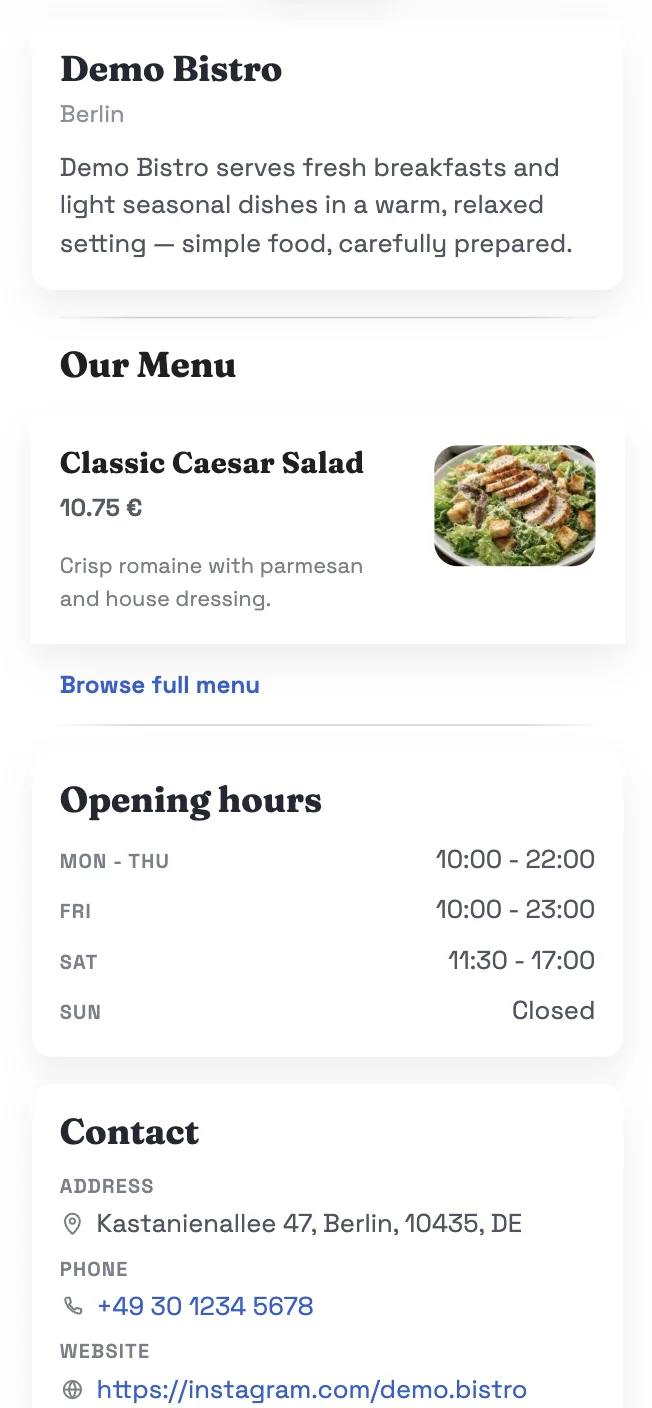
Restaurant mini-site
9:41
QR menu demo

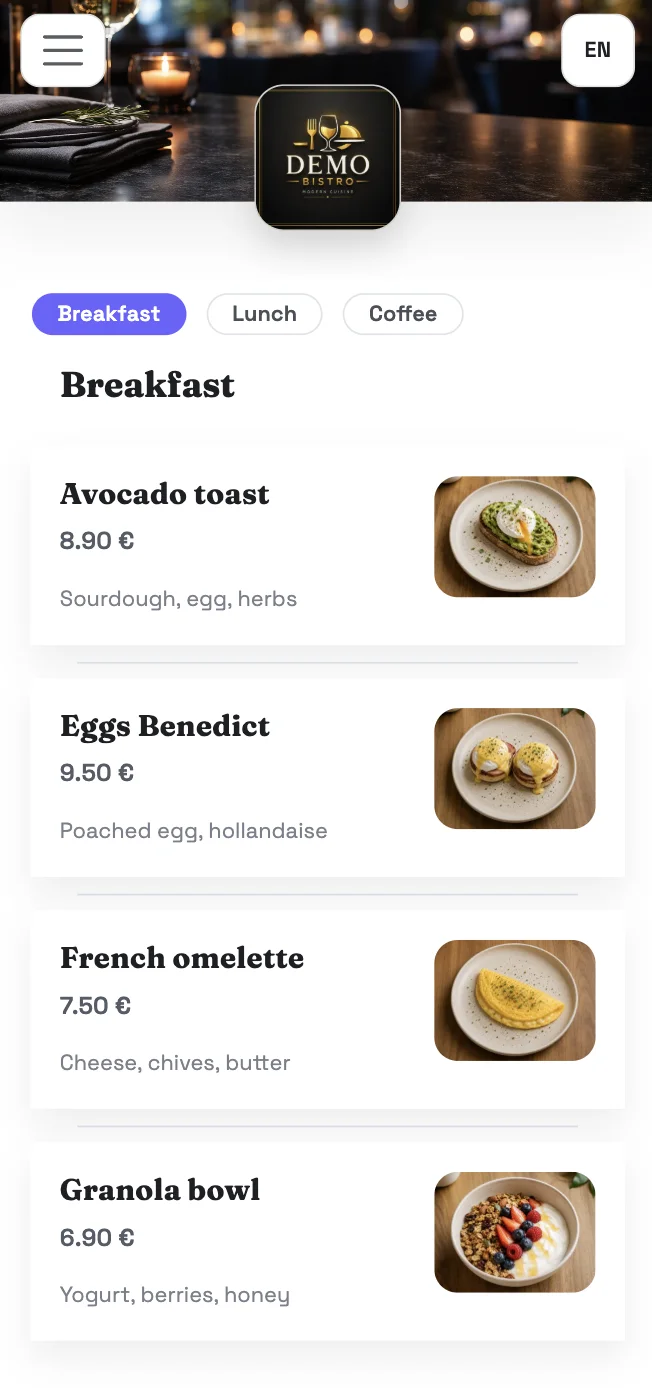
See what your guests will see.

Click to explore the restaurant page and public menu — or scan the QR code to see the table menu as your guests would.

Scan with your phone camera

Paper menus were fine — until they weren't.

Guests order less, tourists struggle, updating costs money, and new customers can't find you online.

📷

No photos, fewer orders

When guests can't see a dish, they play it safe. They skip the special, order something familiar, and your average order shrinks.

🌍

Tourists can't read it

International guests in your area need the menu in their language. A paper menu can't help them.

🖨️

You can't update it from your phone

Something changes in the kitchen. The menu on the table doesn't know yet. And it won't until you reprint.

🔍

Invisible online

Guests Google you before visiting. Without a website, your opening hours and menu are impossible to find.

One bad table experience, one public review — visible forever

An unhappy guest says nothing to you. Two hours later there's a 1-star review on Google Maps or TripAdvisor. You had no chance to fix it. A private feedback channel gives them somewhere to go first.

A QR menu, a restaurant page, and a public menu link. One place to manage them.

Every QRIOAPP subscription gives you all three — each designed for a different moment in a guest's experience.

QR Menu

At the table

Guests scan the QR code on their phone or tablet and see a full digital menu — optimised for mobile. Private, not publicly searchable.

  • Menu sections, dishes, photos, prices
  • AI-assisted translations for tourists
  • Private feedback form — hear complaints before they go public
  • Your QR code to print and place anywhere
Mini-website

When they Google you

A simple restaurant page guests find when they search for you online — hours, location, contacts, and a link to your menu. Works on all devices.

  • Opening hours, address, phone
  • Restaurant name, logo, cover photo
  • Link to your public digital menu
  • Point your Google profile, Instagram, and WhatsApp here
Public Digital Menu

Wherever you share it

Your full menu as a public web page — share it on Instagram, WhatsApp, Google Business, or anywhere online. Works on all devices.

  • Full menu with sections, dishes, photos
  • AI-assisted translations
  • Share via link — no QR scan needed

Usage tracked separately — table scans vs. online visitors.
The restaurant page and public menu are linked; the QR menu is a separate, table-only experience.

Up and running in minutes.

Three steps from your paper menu to a live QR menu, mini-website, and public digital menu.

1

Upload or create your menu

Take a photo of your existing menu or upload a PDF. AI reads it and creates editable dish entries — so you're not typing everything from scratch.

2

Review, add photos, translate

Check the imported items, fix anything, add dish photos from your phone, and translate your menu into languages your tourist guests will understand.

3

Publish and share

Hit publish. Your QR code is ready to print and place on tables. Your restaurant page is live online. Your public menu link is ready to share on Instagram, WhatsApp, or anywhere guests will find you.

AI helps speed up setup. You review and confirm before anything goes live.

Everything you need, nothing you don't.

Built for café and restaurant owners who want to get started without any technical setup.

AI menu import

Upload a photo or PDF of your existing menu. AI structures it into editable items — no manual typing.

✏️

Menu editor

Add, edit, or remove dishes, prices, sections, and descriptions anytime. Changes go live instantly.

AI translation 45+ languages

Translate your full menu for tourists with AI assistance. Review the result and publish when ready.

📸

Dish photos

Add photos directly from your phone. Visual menus help guests choose — and order more.

💬

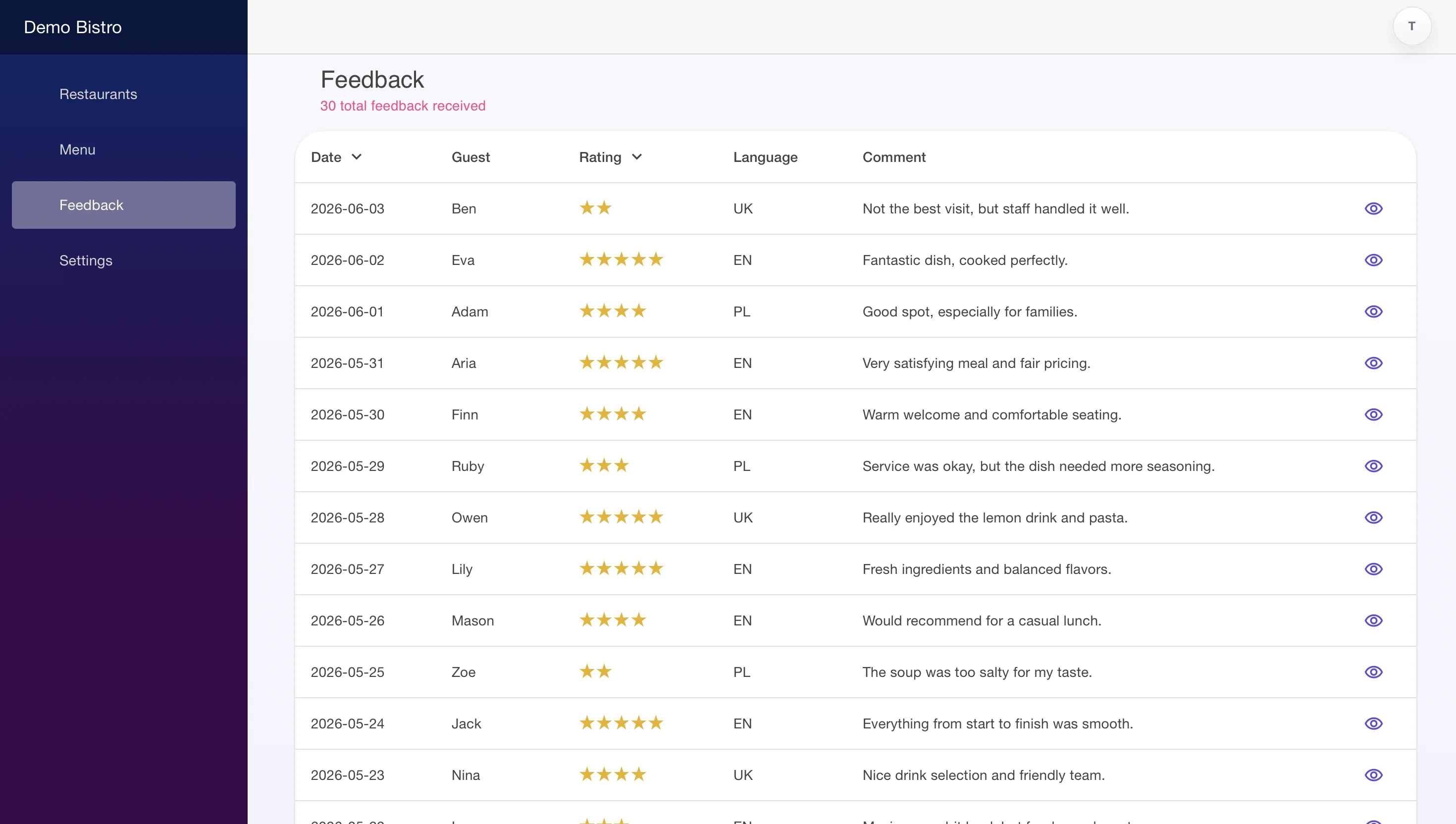
Private guest feedback

Give unhappy guests a private channel before they open Google Maps. Available on Plus and Pro.

🌐

Mini-website

Opening hours, address, contacts, and a link to your menu — all on a public page guests can find and bookmark. Included on every plan.

QR code

QR code

Download your QR code and place it on tables, windows, or printed materials. Guests scan and see the menu instantly.

📈

Monthly usage report

Get a monthly summary of how guests interact with your menu — scans, views, and traffic sources. Know where your visitors are coming from. Pro plan.

From paper menu to three live products.

The admin panel is where you manage everything — menu items, translations, photos, opening hours. One place. No technical knowledge needed.

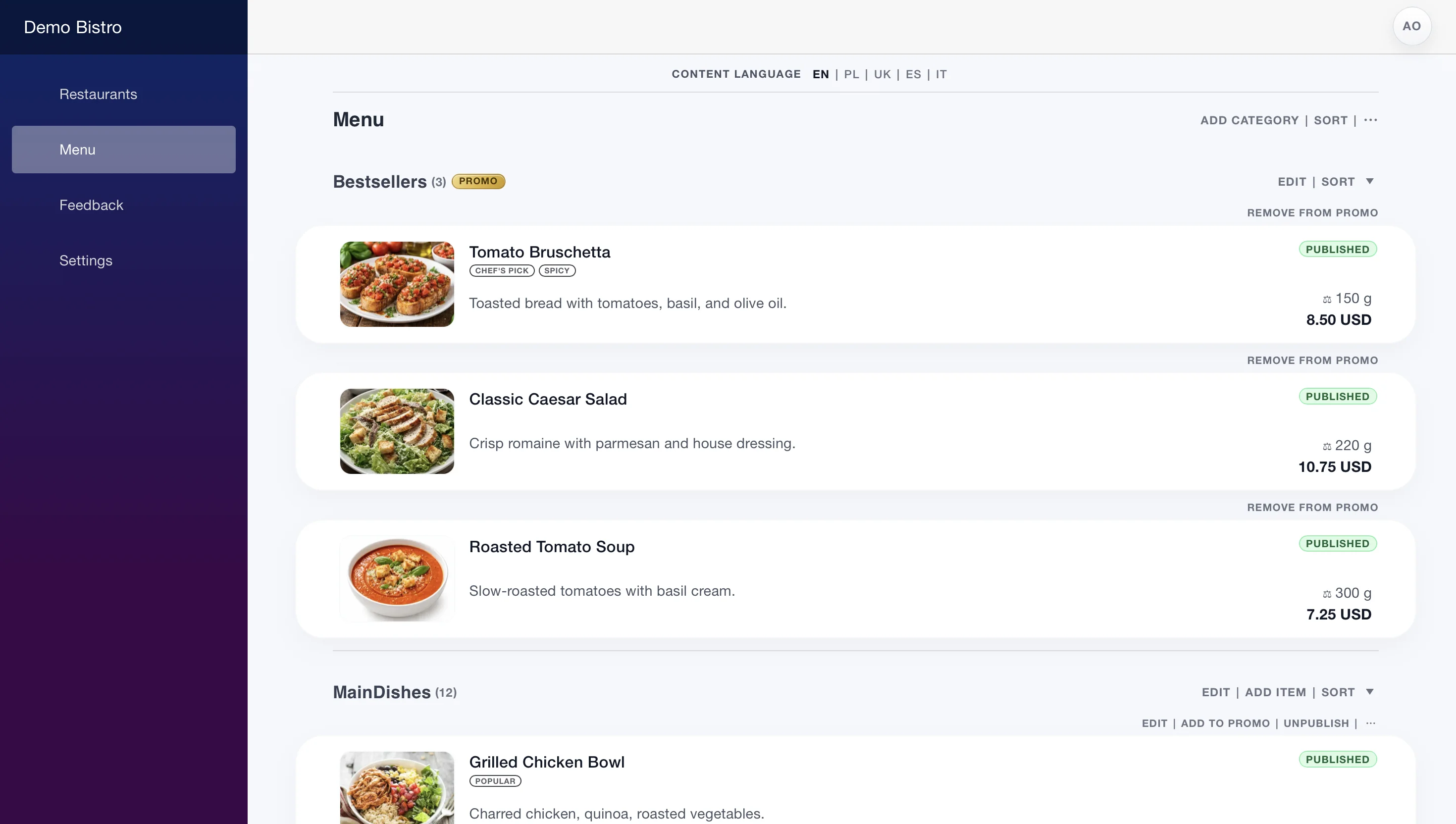
Menu — Demo Bistro
Admin panel menu editor
Menu editor — manage sections, dishes, prices, and photos. Changes go live instantly.
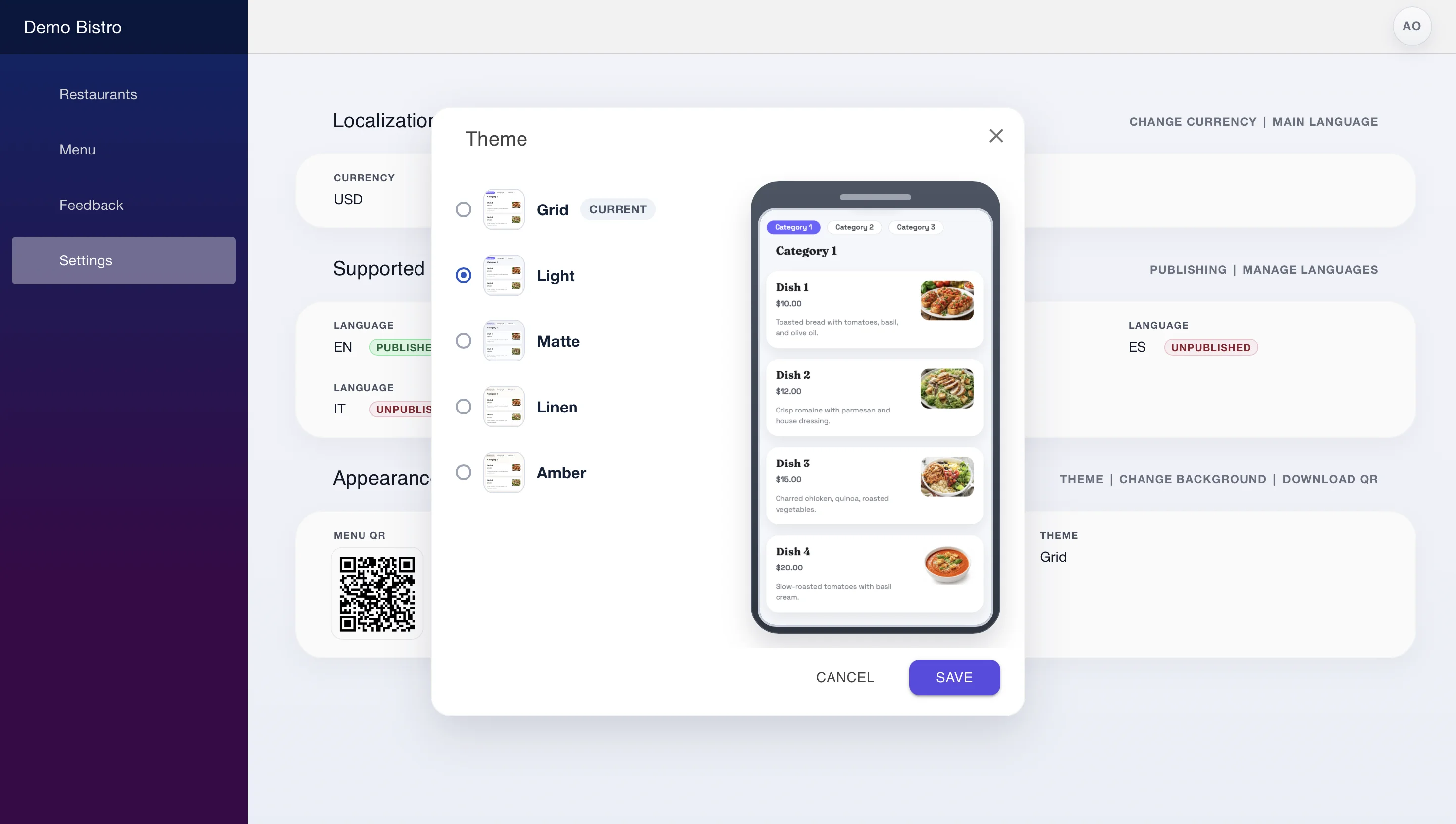
Settings — Demo Bistro
Admin panel theme picker
Theme picker — choose the look of your QR menu with a preview of how it will appear to guests.

Start free. Upgrade when your menu grows.

All plans include the QR menu, mini-website, and public digital menu. You choose based on how many items and languages you need.

Plus

A practical starting plan for most restaurants.

Price to be confirmed
All three products included — QR menu, mini-website & public menu
  • Up to 100 menu items
  • Up to 5 languages
  • Feedback collection
  • AI translation — full menu
  • No "Powered by QRIOAPP" watermark

Pro

Built for larger menus and multilingual operations.

Price to be confirmed
All three products included — QR menu, mini-website & public menu
  • Up to 300 menu items
  • Up to 15 languages
  • Feedback collection
  • AI translation — full menu
  • Guest auto-translate — 45+ languages on demand
  • No "Powered by QRIOAPP" watermark

Start free — no commitment.

Custom plan

Built for multiple restaurants.

For chains, franchises & agencies running several restaurants.

Let's talk
Contact sales

We'll tailor a plan to your setup · or email sales@qrioapp.co

  • Multi-restaurant setup
  • Team members with roles
  • API access
  • Custom design
Feature Free Plus Pro
Menu items 30 100 300
Languages 2 5 15
Menu categories 5 20 50
Multiple menu themes
Promo category
Item options
Menu labels
Feedback collection
AI translations Names & categories Full menu Full menu
Guest auto-translate 45+ languages on demand
AI menu imports / month 5 20 40
Monthly usage report
No QRIOAPP watermark
Priority support

Common questions.

Do I need technical skills or a developer?
No. QRIOAPP is designed for restaurant owners and staff with no technical background. If you can use a smartphone, you can set up your menu. Support is available if you get stuck.
Can I import my existing paper or PDF menu?
Yes. Take a photo of your paper menu or upload a PDF. QRIOAPP's AI will read it and create editable menu items. You review the result, correct anything, and publish when you're ready. The AI speeds things up — you stay in control.
What's the difference between the QR menu and the public digital menu?
The QR menu is designed for guests at your table — mobile and tablet only, not publicly searchable. It includes a private feedback form so guests can share thoughts directly with you. The public digital menu is a web page that works on all devices (including desktop), designed to be found online, and can be shared anywhere — Instagram bio, WhatsApp, Google Business Profile. Both show your menu content.
Can guests order or pay through QRIOAPP?
No. QRIOAPP is a digital menu platform — guests browse your menu, not order through it. There are no online orders, payments, or delivery integrations. Orders happen at the table as normal; QRIOAPP just makes it easier for guests to see and understand what you offer.
What happens when I reach the free plan limit?
Your menu, mini-website, and public digital menu all stay live. You just can't add more items until you upgrade. There are no surprise charges and no automatic upgrades — you choose when you're ready.
Which languages does AI translation support?
QRIOAPP supports 45+ languages across Europe, Asia, the Americas, and the Middle East. Translate your menu through the dashboard with AI — review, adjust, and publish when you're happy with it. On the Pro plan, any language you haven't translated yet is handled automatically on demand, so every guest always sees a menu they can read.
See all supported languages
ArabicAzerbaijaniBasqueBelarusianBosnianBulgarianCatalanChineseCroatianCzechDanishDutchEnglishEstonianFaroeseFinnishFrenchGalicianGeorgianGermanGreekHebrewHungarianIcelandicIndonesianIrishItalianJapaneseKazakhKoreanLatvianLithuanianMacedonianMalteseNorwegianPersianPolishPortugueseRomanianRussianSerbianSlovakSlovenianSpanishSwedishThaiTurkishUkrainianVietnamese
Your restaurant, everywhere guests look. Starting today.

Free to start. Live in minutes. AI translation for international guests. No developer needed.

Create your free menu

Free plan — no credit card required.